Alignment tutorial for 151673 and 151674 from DLPFC
In this tutorial, we will demonstrate how to implement 151673 and 151674 alignment using 3d-OT and calculate the chamfer distance
Loading package
[1]:
from lib_3d_OT.utils import *
import scanpy as sc
import numpy as np
import pandas as pd
import torch
from lib_3d_OT.single_modialty import *
import torch.optim as optim
import warnings
warnings.filterwarnings("ignore")
During startup - Warning messages:
1: package ‘methods’ was built under R version 4.3.2
2: package ‘datasets’ was built under R version 4.3.2
3: package ‘utils’ was built under R version 4.3.2
4: package ‘grDevices’ was built under R version 4.3.2
5: package ‘graphics’ was built under R version 4.3.2
6: package ‘stats’ was built under R version 4.3.2
R[write to console]:                    __           __
   ____ ___  _____/ /_  _______/ /_
  / __ `__ \/ ___/ / / / / ___/ __/
 / / / / / / /__/ / /_/ (__  ) /_
/_/ /_/ /_/\___/_/\__,_/____/\__/   version 6.1.1
Type 'citation("mclust")' for citing this R package in publications.
[ ]:
device = torch.device("cuda:1" if torch.cuda.is_available() else "cpu")
Loading and Pre-processing two slices from 151673 and 151674
First, we need to prepare the single cell spatial data into AnnData objects. AnnData is the standard data class we use in 3d-OT.
See documentation for more details if you are unfamiliar, including how to construct AnnData objects from scratch, and how to read data in other formats (csv, mtx, loom, etc.) into AnnData objects.
dpcais the preprocessing process for reference SLAT.
[3]:
adata1=sc.read_visium('/home/dbj/mouse/DLPFC/DLPFC/151673/')
adata1.var_names_make_unique()
truth = pd.read_csv('/home/dbj/mouse/vision/spatial/DLPFC_annotations/151673_truth.csv', sep='\t', index_col=0)
adata1.obs['truth'] = truth.iloc[:,0]
adata1 = adata1[~adata1.obs['truth'].isna(), :]

adata2=sc.read_visium('/home/dbj/mouse/DLPFC/DLPFC/151674/')
adata2.var_names_make_unique()
truth = pd.read_csv('/home/dbj/mouse/vision/spatial/DLPFC_annotations/151674_truth.csv', sep='\t', index_col=0)
adata2.obs['truth'] = truth.iloc[:,0]
adata2 = adata2[~adata2.obs['truth'].isna(), :]
[4]:
adatalist=[adata1,adata2]
adata1,adata2=dpca(adatalist,n_comps=50,join='inner')
Constructing neighbor graph and training the Pointnet++Encoder
We first build the neighbor graph graph1 of 151673 and train the encoder to get a trained encoder best_model1
[5]:
set_seed(7)
graph1 = prepare_data(adata1, location="spatial", nb_neighbors=8).to(device)
input_dim1 = graph1.express.shape[-1]
model = extractMODEL(args=None,input_dim=input_dim1)
optimizer = optim.Adam(model.parameters(), lr=0.001)
best_model1, min_loss = train_graph_extractor(graph1, model, optimizer, device,epochs=800)
Epoch 800/800, Loss: 2.200454, Min Loss: 2.212034
Constructing neighbor graph and training the Pointnet++Encoder
We then build the neighbor graph graph2 of 151674 and train the encoder to get a trained encoder best_model2
[6]:
set_seed(7)
graph2 = prepare_data(adata2, location="spatial", nb_neighbors=8).to(device)
input_dim2 = graph2.express.shape[-1]
model = extractMODEL(args=None,input_dim=input_dim2)
optimizer = optim.Adam(model.parameters(), lr=0.001)
best_model2, min_loss = train_graph_extractor(graph2, model, optimizer, device,epochs=800)
Epoch 800/800, Loss: 2.350463, Min Loss: 2.356186
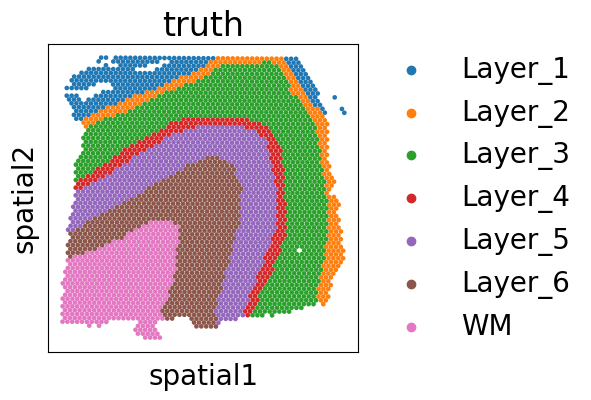
Source align slice truth
[7]:
import matplotlib.pyplot as plt
import copy
plt.rcParams['figure.figsize'] = (4,4)
plt.rcParams['font.size'] = 20
adata1_rotated = copy.deepcopy(adata1)
coords = adata1_rotated.obsm['spatial']

adata1_rotated.obsm['spatial'] = np.column_stack((coords[:, 0],-coords[:, 1]))
fig, ax = plt.subplots()
sc.pl.embedding(adata1_rotated,basis='spatial',color='truth',size=45,ax=ax)
Target align slice truth
[8]:
import matplotlib.pyplot as plt
import copy
plt.rcParams['figure.figsize'] = (4,4)
plt.rcParams['font.size'] = 20
adata2_rotated = copy.deepcopy(adata2)
coords = adata2_rotated.obsm['spatial']

adata2_rotated.obsm['spatial'] = np.column_stack((coords[:, 0],-coords[:, 1]))
fig, ax = plt.subplots()
sc.pl.embedding(adata2_rotated,basis='spatial',color='truth',size=45,ax=ax)

Training the optimal transport module
Enter graph1 and graph2 and the two encoders we trained into the optimal transport model
[10]:
pclouds_list=[graph1,graph2]
[11]:
input_dim1 = pclouds_list[0].express.shape[-1]
input_dim2 = pclouds_list[1].express.shape[-1]
model = UnifiedModel(input_dim1=input_dim1,input_dim2=input_dim2,simk=5,otk=20,reconk=1,best_encoder1=best_model1,best_encoder2=best_model2)
optimizer = torch.optim.Adam(model.parameters(), lr=0.0001)
lr_lambda = lambda epoch: 1.0 if epoch < 340 else 1.0
scheduler = torch.optim.lr_scheduler.LambdaLR(optimizer, lr_lambda)
args = {
    "backward_dist_weight":1.0,
    "use_smooth_flow":1,
    "smooth_flow_loss_weight":1.0,
    "use_div_flow":1,
    "div_flow_loss_weight":1.0,
    "div_neighbor": 8,
    "lattice_steps": 10,
    "nb_neigh_smooth_flow":32,
}


train(model=model,pcloud_list=pclouds_list,optimizer=optimizer,scheduler=scheduler,device=device,nb_epochs=1,use_corr_conf=False,use_smooth_flow=True,use_div_flow=True,args=args)
Time Pair 0,total_loss: 0.0586,smooth_flow_loss: 0.0404 Target Recon Loss: 0.00010402,Div Flow Loss: 0.0181
Visualize and quantify the evaluation of seven region alignment results
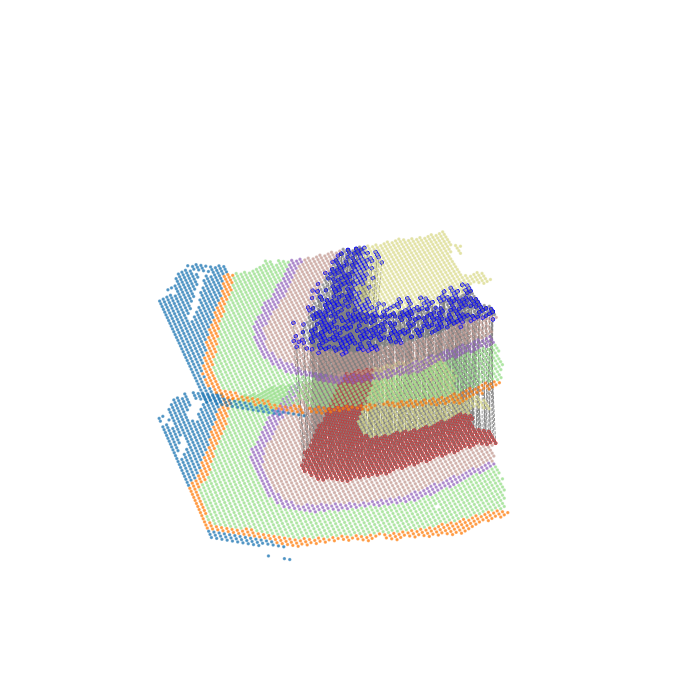
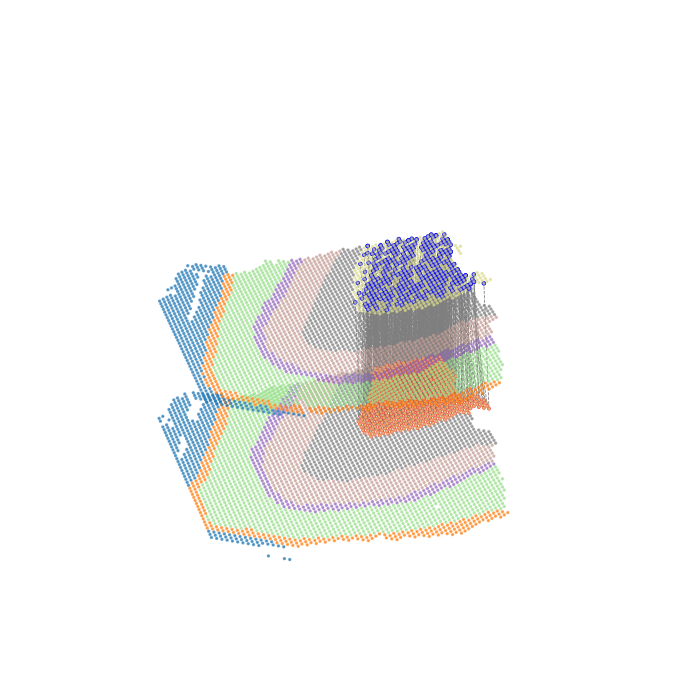
selected_cell_typerepresents the drawn source cell typefinaltruthmeans that the target cell type corresponding to the source cell type that based on the biological understanding, and it is used to obtain the spatial location information of the target cell type and calculate the chamfer distanceall_arrow_endsrepresents all aligned flow end positions from source cell type,it is used to calculate the chamfer distancelayer_1_pcloud_3Drepresents the target cell type spatial position information based on biological understanding, and is used to calculate the chamfer distance
Layer_1 alignment result
[26]:
from lib_3d_OT.plot import *
all_arrow_ends,layer_1_pcloud_3D=plot_selected_cell_type_flow(pclouds_list, model, device,selected_cell_type='Layer_1',finaltruth=['Layer_1'],xlim=(-0.1, 1.1),ylim=(-0.1, 1.1),height_scale=1,size=2,alpha=0.6,
    #save_path='/home/dbj/DPLFC/'
)
Number of arrow ends: 273
Layer 1 points count: 380

-Log10(chamfer_distance) as a performance metric for alignment
[13]:
chamfer_dist = chamfer_distance(all_arrow_ends,layer_1_pcloud_3D)

print(f"chamfer distance: {chamfer_dist}")
chamfer distance: 0.0003613015316660893
Layer_2 alignment result
[14]:
from lib_3d_OT.plot import *
all_arrow_ends,layer_1_pcloud_3D=plot_selected_cell_type_flow(pclouds_list, model, device,selected_cell_type='Layer_2',finaltruth=['Layer_2'],xlim=(-0.1, 1.1),ylim=(-0.1, 1.1),height_scale=1,size=2,alpha=0.6,
    #save_path='/home/dbj/DPLFC/'
)
Number of arrow ends: 253
Layer 1 points count: 224

[15]:
chamfer_dist = chamfer_distance(all_arrow_ends,layer_1_pcloud_3D)

print(f"chamfer distance: {chamfer_dist}")
chamfer distance: 0.0003549892395294974
Layer_3 alignment result
[16]:
from lib_3d_OT.plot import *
all_arrow_ends,layer_1_pcloud_3D=plot_selected_cell_type_flow(pclouds_list, model, device,selected_cell_type='Layer_3',finaltruth=['Layer_3'],xlim=(-0.1, 1.1),ylim=(-0.1, 1.1),height_scale=1,size=2,alpha=0.6,
    #save_path='/home/dbj/DPLFC/'
)
Number of arrow ends: 988
Layer 1 points count: 923

[27]:
chamfer_dist = chamfer_distance(all_arrow_ends,layer_1_pcloud_3D)

print(f"chamfer distance: {chamfer_dist}")
chamfer distance: 0.0003613015316660893
Layer_4 alignment result
[18]:
from lib_3d_OT.plot import *
all_arrow_ends,layer_1_pcloud_3D=plot_selected_cell_type_flow(pclouds_list, model, device,selected_cell_type='Layer_4',finaltruth=['Layer_4'],xlim=(-0.1, 1.1),ylim=(-0.1, 1.1),height_scale=1,size=2,alpha=0.6,
    #save_path='/home/dbj/DPLFC/'
)
Number of arrow ends: 218
Layer 1 points count: 247

[19]:
chamfer_dist = chamfer_distance(all_arrow_ends,layer_1_pcloud_3D)

print(f"chamfer distance: {chamfer_dist}")
chamfer distance: 0.0004005055165088926
Layer_5 alignment result
[20]:
from lib_3d_OT.plot import *
all_arrow_ends,layer_1_pcloud_3D=plot_selected_cell_type_flow(pclouds_list, model, device,selected_cell_type='Layer_5',finaltruth=['Layer_5'],xlim=(-0.1, 1.1),ylim=(-0.1, 1.1),height_scale=1,size=2,alpha=0.6,
    #save_path='/home/dbj/DPLFC/'
)
Number of arrow ends: 673
Layer 1 points count: 621

[21]:
chamfer_dist = chamfer_distance(all_arrow_ends,layer_1_pcloud_3D)

print(f"chamfer distance: {chamfer_dist}")
chamfer distance: 0.0002188742874835671
Layer_6 alignment result
[22]:
from lib_3d_OT.plot import *
all_arrow_ends,layer_1_pcloud_3D=plot_selected_cell_type_flow(pclouds_list, model, device,selected_cell_type='Layer_6',finaltruth=['Layer_6'],xlim=(-0.1, 1.1),ylim=(-0.1, 1.1),height_scale=1,size=2,alpha=0.6,
    #save_path='/home/dbj/DPLFC/'
)
Number of arrow ends: 692
Layer 1 points count: 614
[23]:
chamfer_dist = chamfer_distance(all_arrow_ends,layer_1_pcloud_3D)

print(f"chamfer distance: {chamfer_dist}")
chamfer distance: 0.00039949498587779836
WM alignment result
[24]:
from lib_3d_OT.plot import *
all_arrow_ends,layer_1_pcloud_3D=plot_selected_cell_type_flow(pclouds_list, model, device,selected_cell_type='WM',finaltruth=['WM'],xlim=(-0.1, 1.1),ylim=(-0.1, 1.1),height_scale=1,size=2,alpha=0.6,
    #save_path='/home/dbj/DPLFC/'
)
Number of arrow ends: 513
Layer 1 points count: 625
[25]:
chamfer_dist = chamfer_distance(all_arrow_ends,layer_1_pcloud_3D)

print(f"chamfer distance: {chamfer_dist}")
chamfer distance: 0.00018394429114206693