Cross_platform
Alignment tutorial for seq-FISH and Stereo-seq
In this tutorial, we will demonstrate how to implement cross-platform alignment using 3d-OT and calculate the chamfer distance.
Loading package
[1]:
from lib_3d_OT.utils import *
import scanpy as sc
import numpy as np
import pandas as pd
import torch
from lib_3d_OT.single_modialty import *
import torch.optim as optim
import warnings
warnings.filterwarnings("ignore")
During startup - Warning messages:
1: package ‘methods’ was built under R version 4.3.2
2: package ‘datasets’ was built under R version 4.3.2
3: package ‘utils’ was built under R version 4.3.2
4: package ‘grDevices’ was built under R version 4.3.2
5: package ‘graphics’ was built under R version 4.3.2
6: package ‘stats’ was built under R version 4.3.2
R[write to console]:                    __           __
   ____ ___  _____/ /_  _______/ /_
  / __ `__ \/ ___/ / / / / ___/ __/
 / / / / / / /__/ / /_/ (__  ) /_
/_/ /_/ /_/\___/_/\__,_/____/\__/   version 6.1.1
Type 'citation("mclust")' for citing this R package in publications.
Could not load compiled 3D CUDA chamfer distance
[ ]:
device = torch.device("cuda:1" if torch.cuda.is_available() else "cpu")
1. Loading and Pre-processing two slices from E8.75seq-FISH mouse embryo and E9.5 Stereo-seq mouse embryo
First, we need to prepare the single cell spatial data into AnnData objects. AnnData is the standard data class we use in 3d-OT.
See documentationfor more details if you are unfamiliar, including how to construct AnnData objects from scratch, and how to read data in other formats (csv, mtx, loom, etc.) into AnnData objects.
dpcais the preprocessing process for reference SLAT.
[3]:
adata1=sc.read_h5ad('/home/dbj/mouse/seq-flash/adata_seqFISH_mouse_E8.75.h5ad')
adata1.obs['truth']=adata1.obs['celltype']
adata2=sc.read_h5ad('/home/dbj/mouse/oT/different-time/E9.5.h5ad')
adata2.obs['truth']=adata2.obs['annotation']
adatalist=[adata1,adata2]
adata1,adata2=dpca(adatalist,n_comps=50,join='inner')
2. Constructing neighbor graph and training the Pointnet++Encoder
We first build the mouse embryo graph structure
graph1of Stereo-seq E9.5 and train the encoder to get a trained encoderbest_model1.
[4]:
set_seed(7)
graph1 = prepare_data(adata2, location="spatial", nb_neighbors=8).to(device)
input_dim1 = graph1.express.shape[-1]
model1 = extractMODEL(args=None,input_dim=input_dim1)
optimizer = optim.Adam(model1.parameters(), lr=0.001)
best_model1, min_loss = train_graph_extractor(graph1, model1, optimizer, device,epochs=1150)
Epoch 1150/1150, Loss: 0.396464, Min Loss: 0.397595
Building the mouse embryo graph structure
graph2of seq-FISH E8.75 and train the encoder to get a trained encoderbest_model2.
[5]:
set_seed(7)
graph2 = prepare_data(adata1, location="spatial", nb_neighbors=8).to(device)
input_dim2 = graph2.express.shape[-1]
model2 = extractMODEL(args=None, input_dim=input_dim2)
optimizer2 = optim.Adam(model2.parameters(), lr=0.001)
best_model2,min_loss = train_graph_extractor(graph2, model2,optimizer2, device, epochs=500)
Epoch 500/500, Loss: 0.422382, Min Loss: 0.422330
Training the optimal transport module
Enter graph1 and graph2 and the two encoders we trained into the optimal transport model.
[6]:
pclouds_list=[graph1,graph2]
[7]:
input_dim1 = pclouds_list[0].express.shape[-1]
input_dim2 = pclouds_list[1].express.shape[-1]
model = UnifiedModel(input_dim1=input_dim1,input_dim2=input_dim2,simk=5,otk=2000,reconk=1,best_encoder1=best_model1,best_encoder2=best_model2)
optimizer = torch.optim.Adam(model.parameters(), lr=0.0001)
lr_lambda = lambda epoch: 1.0 if epoch < 340 else 1.0
scheduler = torch.optim.lr_scheduler.LambdaLR(optimizer, lr_lambda)
args = {
    "backward_dist_weight":1.0,
    "use_smooth_flow":1,
    "smooth_flow_loss_weight":1.0,
    "use_div_flow":1,
    "div_flow_loss_weight":1.0,
    "div_neighbor": 8,
    "lattice_steps": 10,
    "nb_neigh_smooth_flow":32,
}


train(model=model,pcloud_list=pclouds_list,optimizer=optimizer,scheduler=scheduler,device=device,use_corr_conf=False,use_smooth_flow=True,use_div_flow=True,args=args)
Time Pair 0,total_loss: 0.2421,smooth_flow_loss: 0.1522 Target Recon Loss: 0.00004927,Div Flow Loss: 0.0899
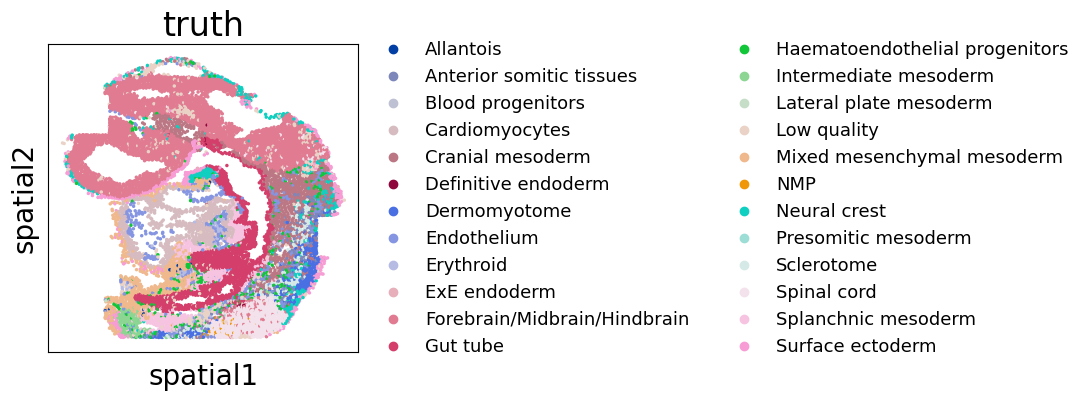
Target align slice truth
[8]:
import matplotlib.pyplot as plt
import copy
plt.rcParams['figure.figsize'] = (4,4)
plt.rcParams['font.size'] = 20
adata1_rotated = copy.deepcopy(adata1)
coords = adata1_rotated.obsm['spatial']
adata1_rotated.obsm['spatial'] = np.column_stack((coords[:, 0],-coords[:, 1]))
fig, ax = plt.subplots()
sc.pl.embedding(adata1_rotated,basis='spatial',color='truth',size=25,ax=ax,legend_fontsize=13)
Source align slice truth
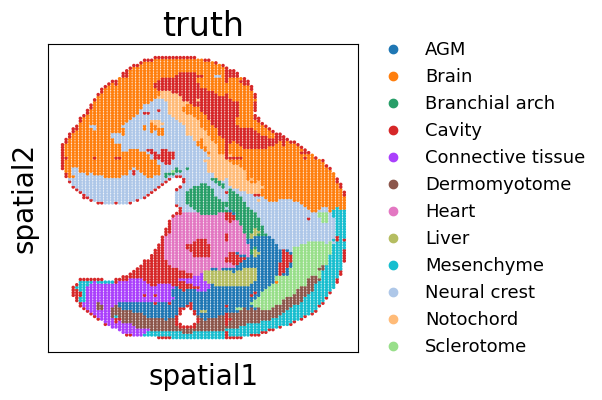
[9]:
import matplotlib.pyplot as plt
import copy
plt.rcParams['figure.figsize'] = (4,4)
plt.rcParams['font.size'] = 20
adata2_rotated = copy.deepcopy(adata2)
coords = adata2_rotated.obsm['spatial']

adata2_rotated.obsm['spatial'] = np.column_stack((coords[:, 0],-coords[:, 1]))
fig, ax = plt.subplots()
sc.pl.embedding(adata2_rotated,basis='spatial',color='truth',size=25,ax=ax,legend_fontsize=13)
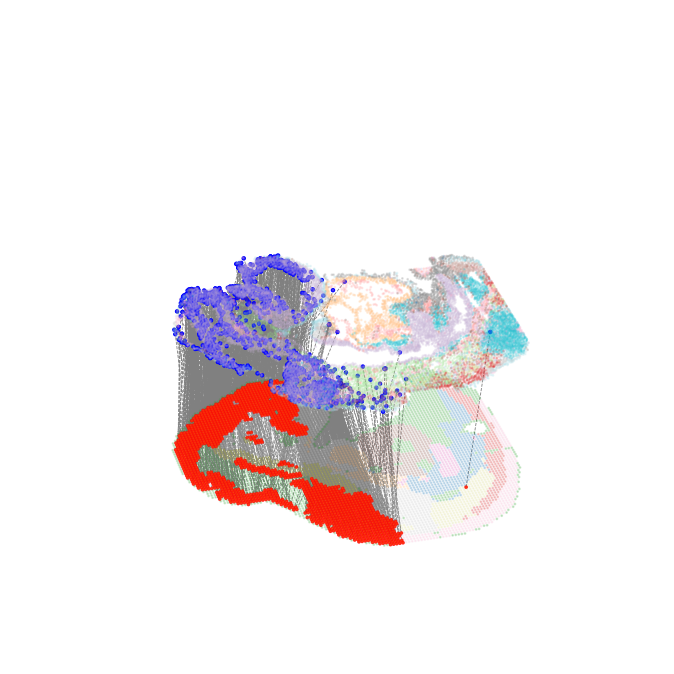
Visualize and quantify the evaluation of Brain region alignment results
selected_cell_typerepresents the drawn source cell type.finaltruthmeans that the target cell type corresponding to the source cell type that based on the biological understanding, and it is used to obtain the spatial location information of the target cell type and calculate the chamfer distance.all_arrow_endsrepresents all aligned flow end positions from source cell type,it is used to calculate the chamfer distance.layer_1_pcloud_3Drepresents the target cell type spatial position information based on biological understanding, and is used to calculate the chamfer distance.
[10]:
from lib_3d_OT.plot import *
all_arrow_ends,layer_1_pcloud_3D=plot_selected_cell_type_flow(pclouds_list, model, device,selected_cell_type='Brain',finaltruth=['Forebrain/Midbrain/Hindbrain'],xlim=(-0.1, 1.1),ylim=(-0.1, 1.1),height_scale=1,size=1,alpha=0.2,
    #save_path='/home/dbj/DPLFC/'
)
Number of arrow ends: 1518
Layer 1 points count: 4875
-Log10(chamfer_distance)as a performance metric for alignment
[11]:
chamfer_dist = chamfer_distance(all_arrow_ends,layer_1_pcloud_3D)

print(f"chamfer distance: {chamfer_dist}")
chamfer distance: 0.0005038145163827955
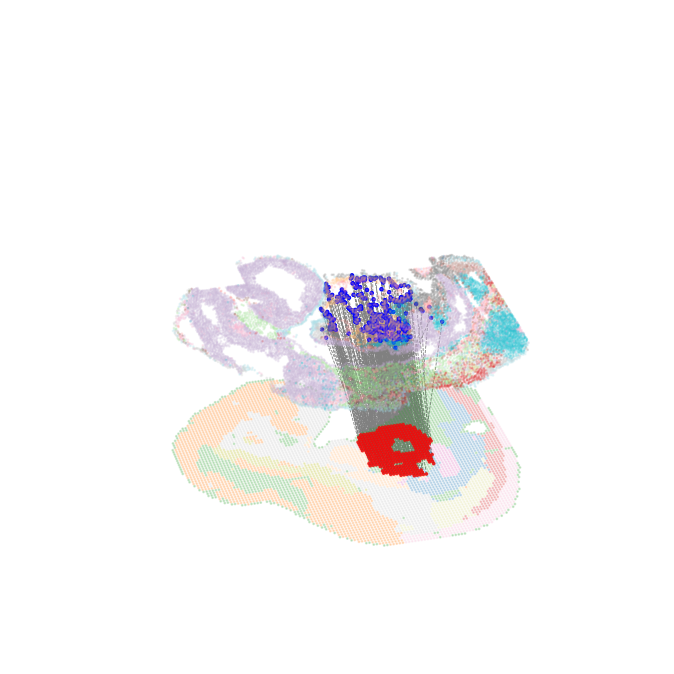
Visualize and quantify the evaluation of Heart region alignment results
[10]:
from lib_3d_OT.plot import *
all_arrow_ends,layer_1_pcloud_3D=plot_selected_cell_type_flow(pclouds_list, model, device,selected_cell_type='Heart',finaltruth=['Cardiomyocytes'],xlim=(-0.1, 1.1),ylim=(-0.1, 1.1),height_scale=1,size=1,alpha=0.2,
    #save_path='/home/dbj/DPLFC/'
)
Number of arrow ends: 382
Layer 1 points count: 782
[11]:
chamfer_dist = chamfer_distance(all_arrow_ends,layer_1_pcloud_3D)

print(f"chamfer distance: {chamfer_dist}")
chamfer distance: 0.0003664510794338697
Visualize and quantify the evaluation of Neural crest region alignment results
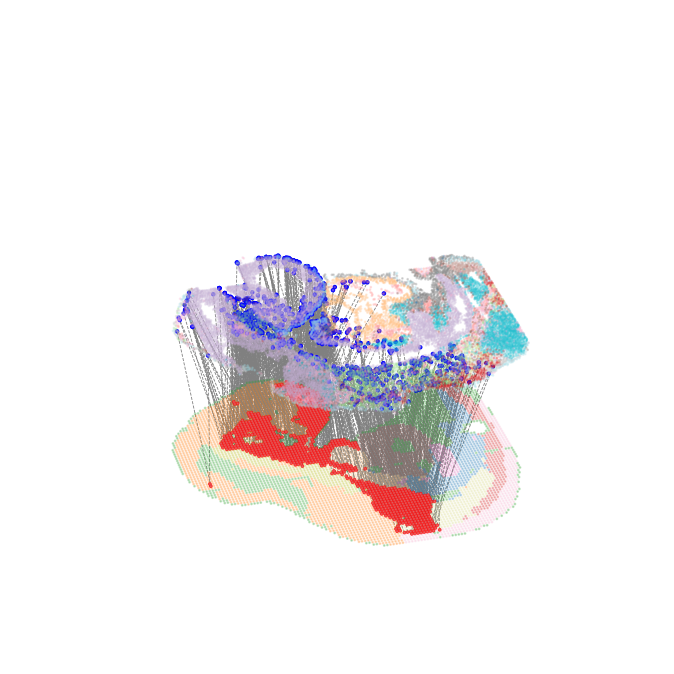
We follow SLAT study sets the alignment target of Neural Creas as a collection of Cranial mesoderm, Neural Crest, Surface ectorm.
[12]:
all_arrow_ends,layer_1_pcloud_3D=plot_selected_cell_type_flow(pclouds_list, model, device,selected_cell_type='Neural crest',finaltruth=['Cranial mesoderm', 'Neural crest', 'Surface ectoderm'],xlim=(-0.1, 1.1),ylim=(-0.1, 1.1),height_scale=1,size=1,alpha=0.25,
    #save_path='/home/dbj/DPLFC/'
)
Number of arrow ends: 1008
Layer 1 points count: 2169
[13]:
chamfer_dist = chamfer_distance(all_arrow_ends,layer_1_pcloud_3D)

print(f"chamfer distance: {chamfer_dist}")
chamfer distance: 0.005473908230508169